Clova.Email Help
Answers, guides, and what's new.
What's new · 17 October 2026
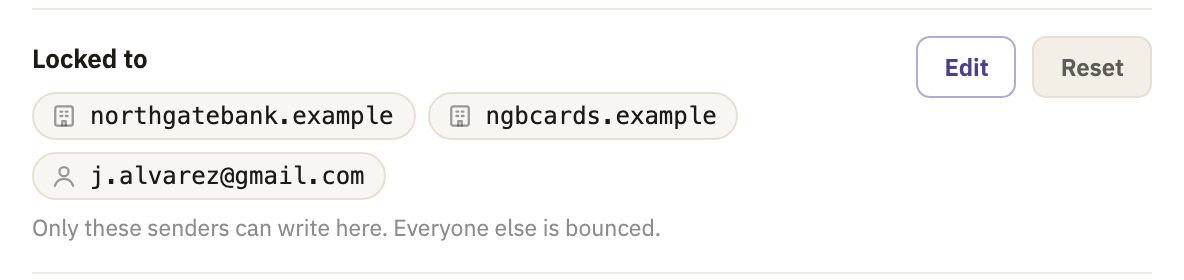
A one-sender inbox can now take mail from five senders
When your bank writes from a second domain, or a colleague needs the same address, let them in from the inbox's settings.
Start here
- 1 minMake your first addressEvery address you give out can be an inbox of its own. Pick the kind that fits who's going to write to it.
- 2 minThe kinds of inboxPermanent, one-sender, prefix and temporary. What each one is for, and who it takes mail from.
- 2 minSign in with a passkeyNo password to remember or type. Your phone or computer proves it's you, with your face, your fingerprint or its screen lock.
Topics
Getting started
Make your first addressThe kinds of inboxSign in with a passkeySign in with GoogleConnect an AI assistant
Inboxes
How a one-sender inbox locksLet more senders into a one-sender inboxMake up addresses with a prefixTemporary inboxes, and what happens to their mailPermanent addressesSwitch an inbox off, or give it an end dateDelete an inbox, and bring an address back
Read, reply and writeSearch your mailPin a conversationBlock a sender or a whole domainThe spam folderPictures and logos beside your mailAttachments
Forwarding
Forward an inbox to Gmail, Outlook or anywhereConfirm a forwarding addressWhen forwarding pauses, and how to resume itKeep a copy here, or not
Questions people ask
A one-sender inbox is locked. How do I get mail from someone else?
Open the inbox's settings, select Edit next to Locked to, and add their domain, or their own address if they use Gmail or a similar provider. They can write straight away.
Can I get a deleted address back?
Yes, the address, though not its mail. Make a new inbox with the same name, and Clova offers to bring it back: select Resurrect it. It comes back unlocked, and locks again as a new one does.
What happens when a temporary inbox expires?
It stops taking mail: anything sent to it after that is bounced. The mail already in it stays, unless you chose to delete it when the inbox expires, as a Throwaway inbox does. An expired inbox with no mail left is deleted soon after.
Until then, you can give it more time in its settings: change Expires, or, once it has expired, switch it back on with Enable.
Does Clova read my mail?
No person here reads your mail or opens your attachments as a matter of course. The one exception is a message reported as abusive, as spam or as illegal: a person may then read that message, to decide what to do about it.
Software checks every message as it arrives, to see who sent it and to look for spam, abuse and illegal material, and no person is involved in that. We don't read mail to improve a product, to train a model, or to build a profile of you.